Time Recording
Why do we record time?
Timesheets are incredibly valuable to us as a business. They are the lifeblood and financial health of our company.
It’s how we pay salaries, find money to train and upskill, outfit everyone with the equipment and devices needed to do their work properly and ‘pay the rent’.
Timesheets enable you to see where you have spent your time – information that you can use to measure yourself, optimise how you apply your time and effort, direct your energy to the right tasks and identify process inefficiencies.
You are performing a vital function in the business. It’s all our hard work, effort, blood sweat and tears translated into something we can be compensated for. Many people see your timesheets or rely on the information contained in them to run our business.
How we use timesheets at Glucode?
- We track the time spent on work assigned to us by our clients so that we can invoice them for it – and do so with confidence. The detailed information on each time entry allows us to be accountable and transparent with our clients about how we spent that time.
- We also use the overall data to calculate how much a project or product cost us to build – which in turn means we are accountable and transparent to our stakeholders. Without this information, it is hard to know if a project is contributing profits to our organisation or draining us.
How you are measured on your performance in this area?
We rely on you to do this task professionally, properly and on time. If it is not, the consequence is that we are questioned by our clients, who may delay our payments. This can have all kinds of ramifications for our financial standing as a company.
This is a company-wide KPI (Key Performance Indicator) for every individual who works at Glucode and we are all measured equally in how we perform it. It is a baseline for performance, speaking to the care and attention to detail you direct to the administrative and organisational aspects of your role. Getting it right shows you’re attentive to your role.
Here is how it is measured
Punctual submission of timesheets:
- This is weekly, usually on Fridays or as defined by your Lead or Delivery Manager.
Detailed and complete submission of timesheets:
- You’ll be assessed on this by the Delivery Managers, the Head of Finance and anyone else tasked with reviewing your timesheets.
Submitting timesheets without any unnecessary input from your Leads:
- We expect you to be on top of the completion of your timesheets, and proud of what you submit at the end of each week.
- Obviously, we allow reasonable exceptions for your questions to clear up any upfront confusion you might have when billing to a new project.
- Do it right the first time!
How do we record time?
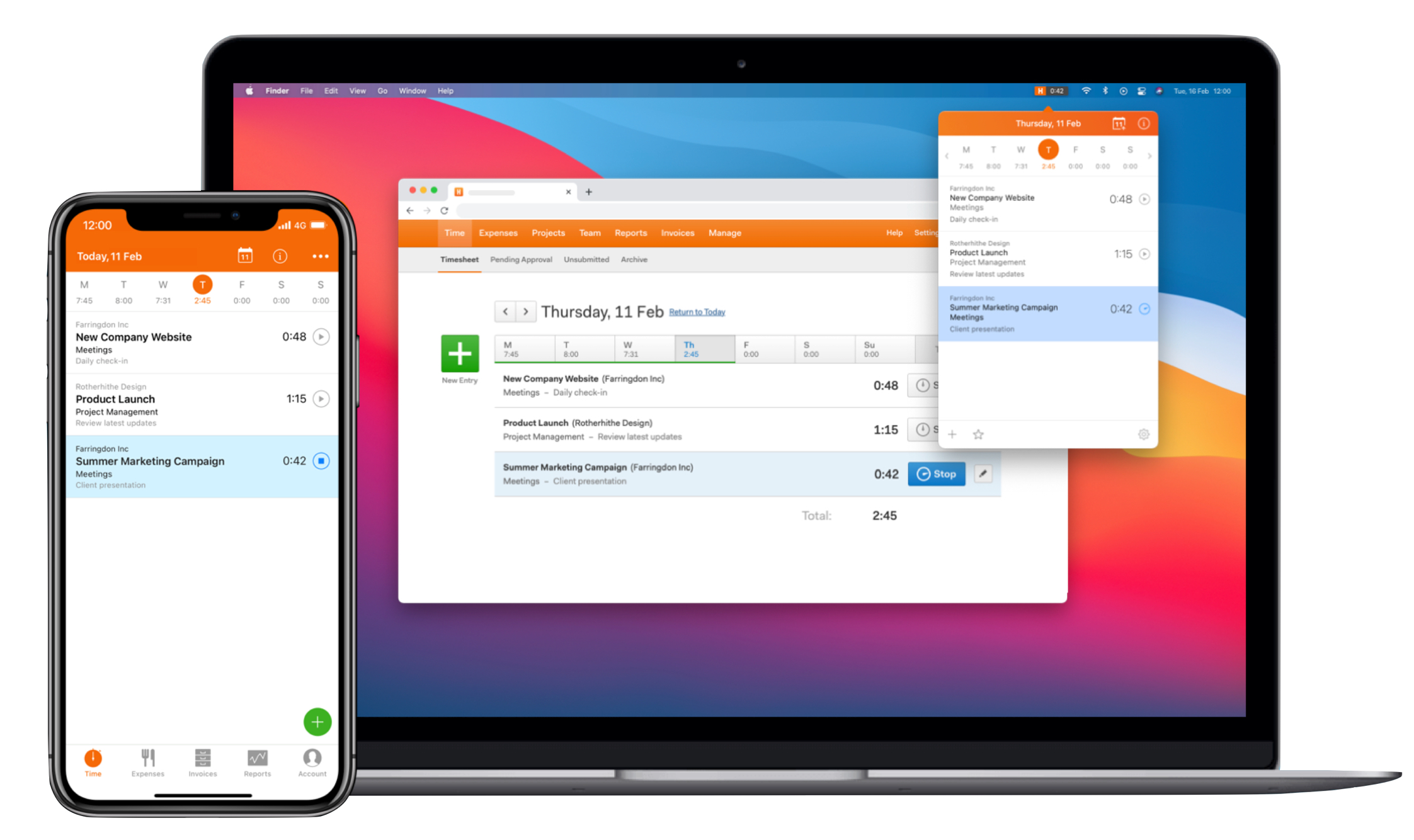
We use Harvest for tracking time
- Harvest is how we track time and expenses.
- Start and stop timers as you work through your to-do list, or enter all your hours into your timesheet manually.
- Track time to specific clients, projects, and tasks, and add detailed notes to remember what you worked on.
- Use the Mac app to start a timer from your desktop, or the Chrome extension to track time from your browser. The mobile app let you record time on the run.
- To track an expense claim: take a photo of your receipt, add details, and save.
Info
If you use timers, don’t forget to round your entries off to 15 minute increments once complete.
Success
See some of the productivity hacks for Harvest.
Timesheet rules and guidelines
In order to perform well in this area - familiarise yourself with the timesheet rules and guidelines.
Recording your time
Time is recorded to projects
To record time to a project, you must first be assigned to the project.
-
If you cannot find the project on Harvest then you are not assigned to it,
contact your Delivery Manager or Lead to request that you are.
- There are projects on Harvest for everything we do.
- Each client has one or more projects for you to record time to - each client can also have different requirements on how to record time. See the respective projects on Basecamp for specifics.
- Leave and holidays are recorded to a project specifically created for them.
- Glucode-specific activities are also recorded to specific projects.
What you should record
Everything you do at work or for work should be recorded in your timesheet e.g. meetings, travel to and from clients, leave (including public holidays), training and research.
You must record at least 40 hours per week, excluding overtime (please note that overtime must be approved by your client, delivery manager and/or relevant lead before you do it), This will also include:
- Leave and public holidays
- Time spent having fun at Glucode (but not free time of your own - for example, your lunch hour). Please note that you may record 1 hour per week for fun for team - related outings or gatherings which you have all agreed to attend, or which relate to your working social environment.
What you shouldn’t record
- Lunch time: please do not record your lunch break to your timesheet. This is not considered part of your 40 hours each week.
- Travel to and from Glucode’s offices (our normal place of business)
- Lunchtime sessions (e.g. brown bag sessions, AMAs, etc.) - it is your choice to attend these with your own free time.
Client Projects
Billable work must be assigned to the correct client project(s) - each client has their own project(s) loaded on Harvest. Your Delivery Manager or Lead will help you find these and explain how to record to the project you are working on (please note that these also change from time to time and you will be expected to keep up-to-date). Ensure any work you do is recorded to these and not to any Internal or Glucode-specific projects, or we cannot invoice for it.
We are committed to providing our clients with a service, as defined by hours which they have agreed to pay for. Our business model is shaped around being able to bill for the great service you provide. If you’ve provided it, please make sure you correctly allocate so we can bill for it.
In the case that the client has multiple projects to record to, this means that there are multiple stakeholders our client needs to invoice to or that we need to invoice upfront, or that our stakeholders need to track costs as they are being incurred for budgeting purposes. Ensure you understand where you can bill and allocate it correctly.
Info
It can be hard to untangle incorrect allocations after the fact, and it will end up impacting not only yourself, but also your colleagues involved in invoicing our clients and our client’s finance personnel. The time spent correcting entries can be used more meaningfully elsewhere.
Acceptable timesheet entries
What does an acceptable timesheet entry look like?
While we believe that you’ve done meaningful and necessary work in the time you’ve recorded on your timesheet, we still need to be able to contextualise for it, when asked.
Many of those responsible for processing and paying our invoices are not as close to the detail of the work you do, nor may they understand the care and effort put into doing it - be it generating a new feature or fixing a bug that has been frustrating many users. But remember that they only need to understand what they are paying for.
Imagine shopping for clothes, but there are no price tags attached and you receive only a large total at checkout for the items you chose: you wouldn’t be sure which items cost you the most, and whether they felt worth the money. When our stakeholders are scrutinising this kind of detail, this is what they are looking to understand: the cost of something versus the business value they are extracting.
Therefore, we must provide this detail upfront so they understand, and get a chance to engage with us meaningfully on why, for example, fixing a defect may have legitimately required 50 hours of work.
What you did with your time and why?
For us, the minimum level of detail equates to what you did with your time and why. Be able to specify what value you created. This is not always easy, given that what you are doing may seem incomprehensible to someone without a skillset like to your own. Supply enough detail that you can answer questions about what you did a month or two later, as this is usually when we are asked questions. You may not remember the details by then.
If anyone asks, you should be able to reference these entries to account for the depth of the work you did or how you spent your time. Think of yourself as your own small business within the company.
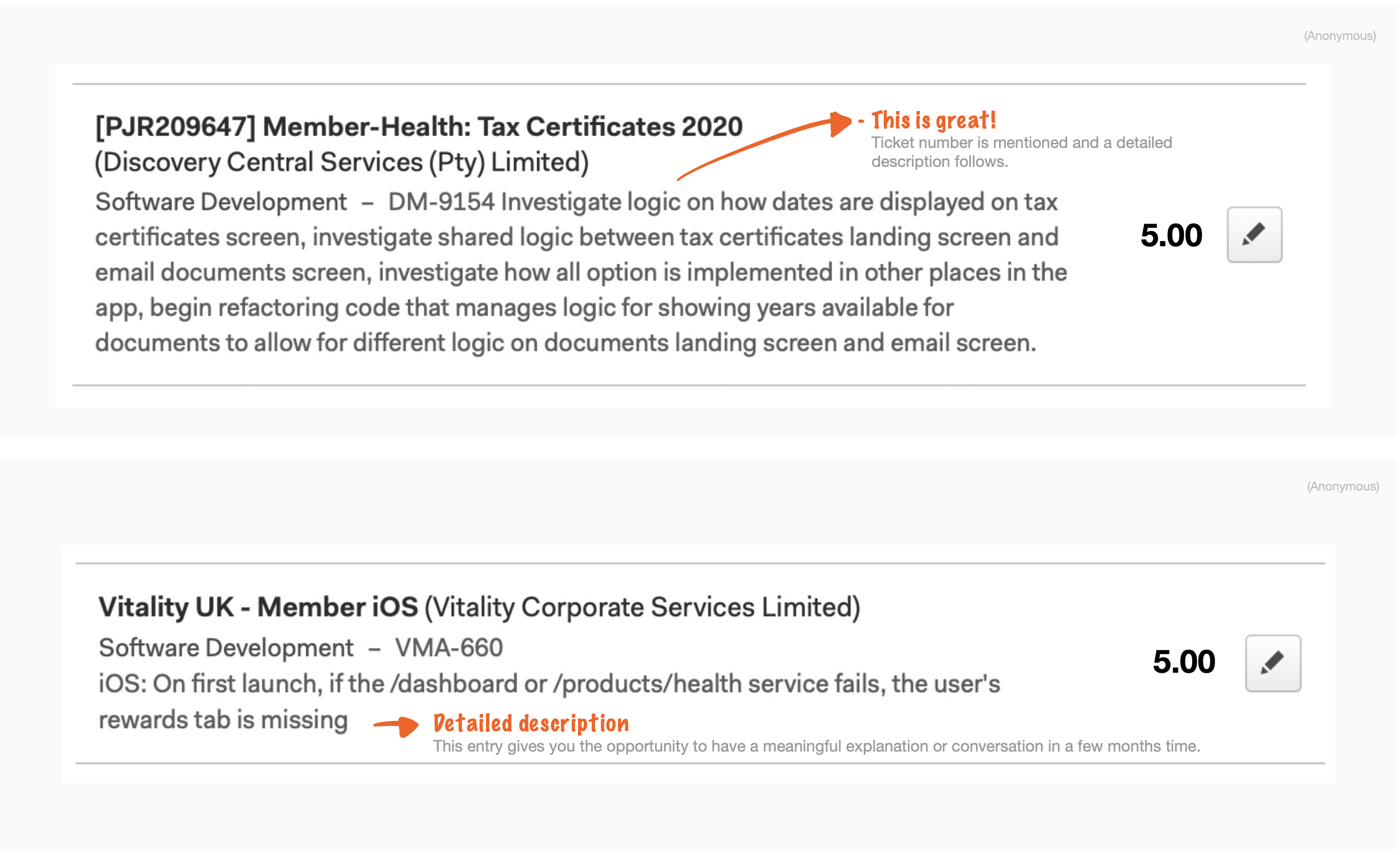
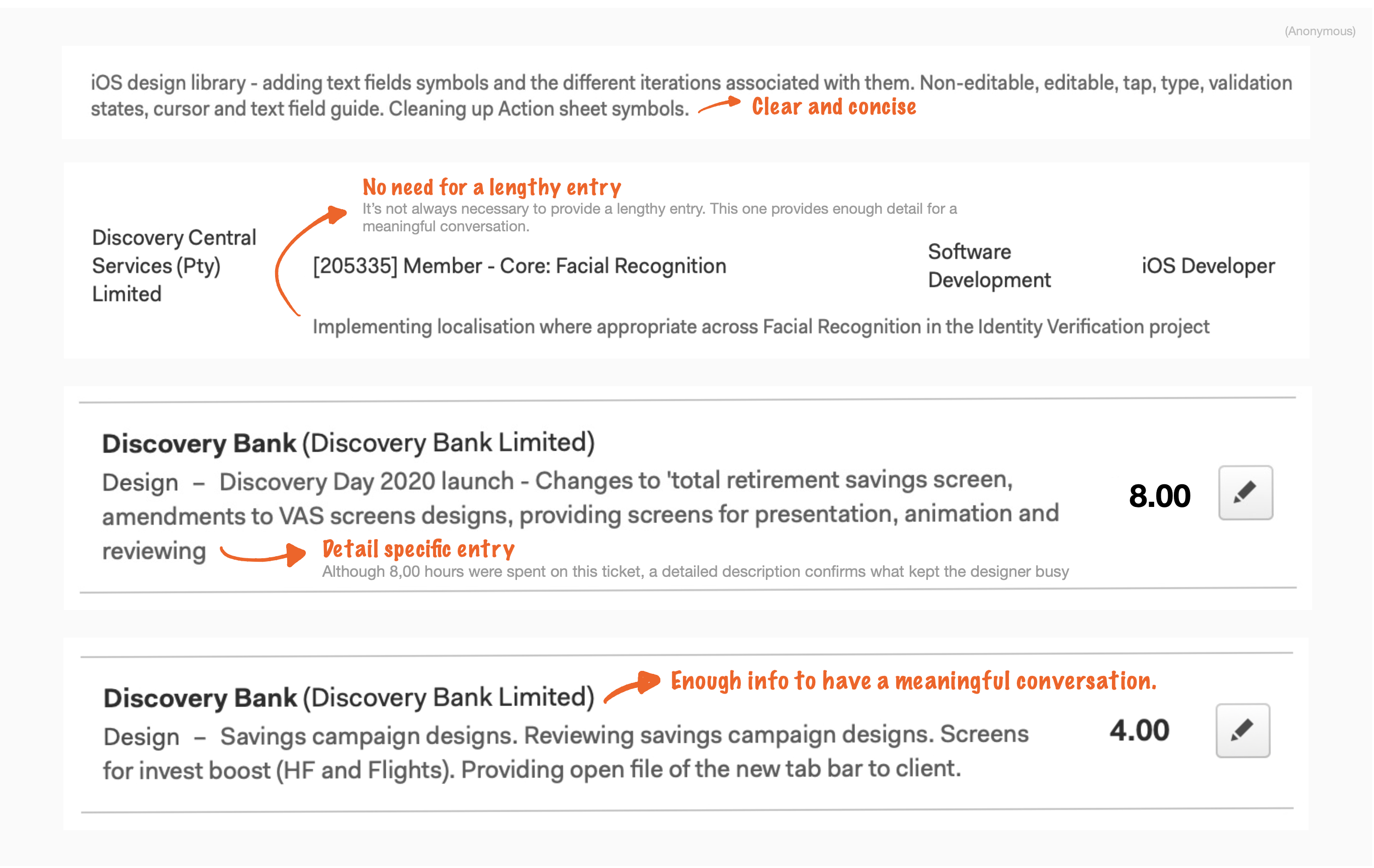
:thumbsup: A good rule of thumb: add enough information to enable a meaningful conversation.
When creating an entry, keep the following in mind when you add detail to the comments section
Include as much information as possible about what you worked on, so that it is recognisable to both the person approving your timesheet internally and the client.
- Remember other people not familiar with the project (for example, finance personnel at our client) will also see your timesheet.
Create separate timesheet entries for different stories / tasks that you work on.
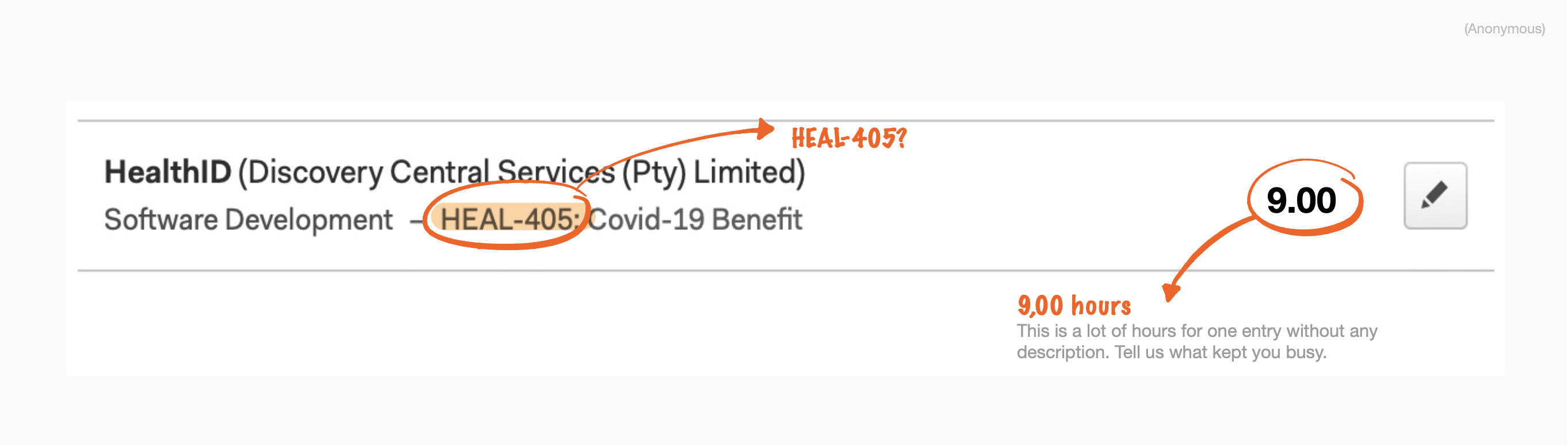
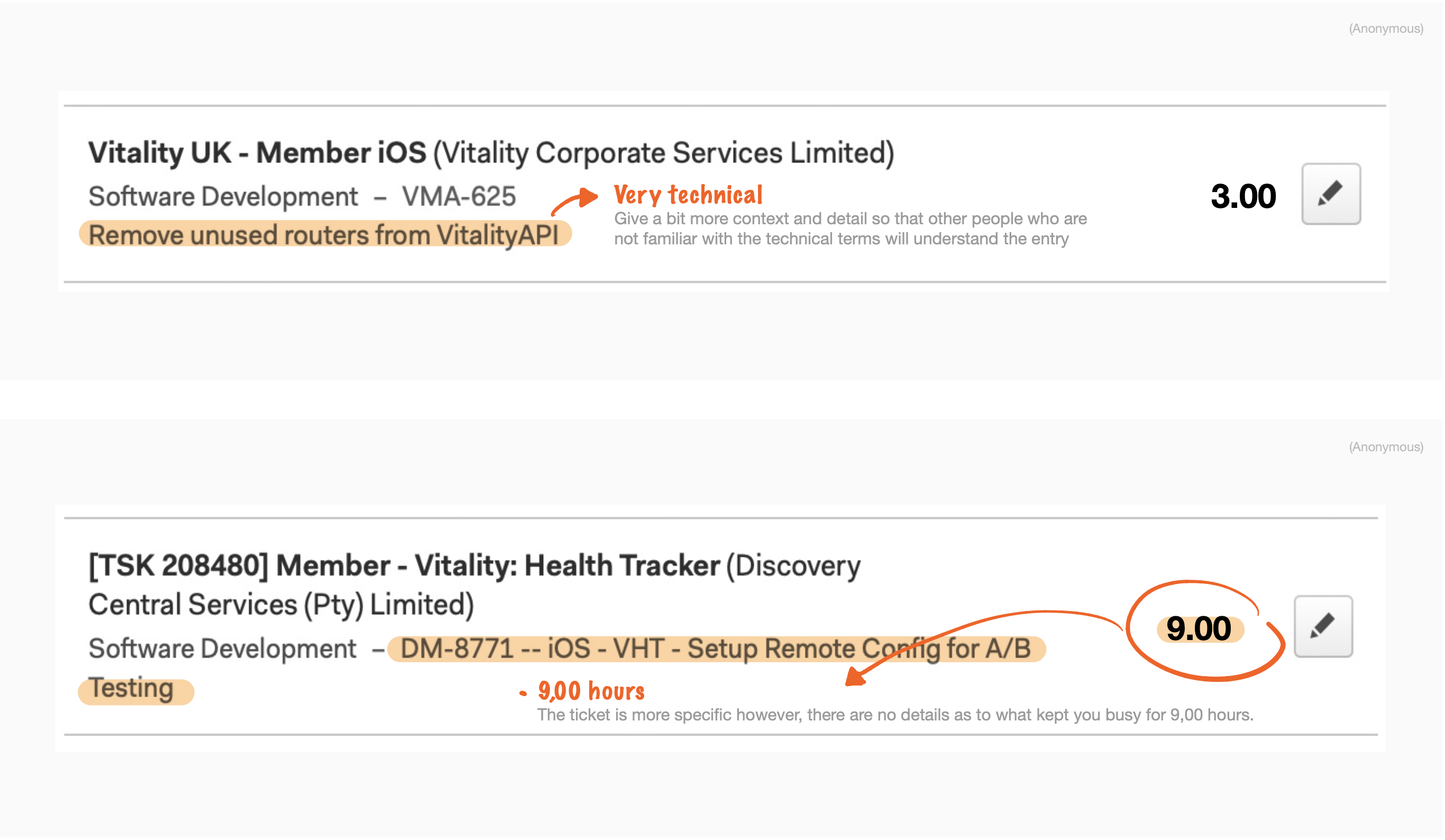
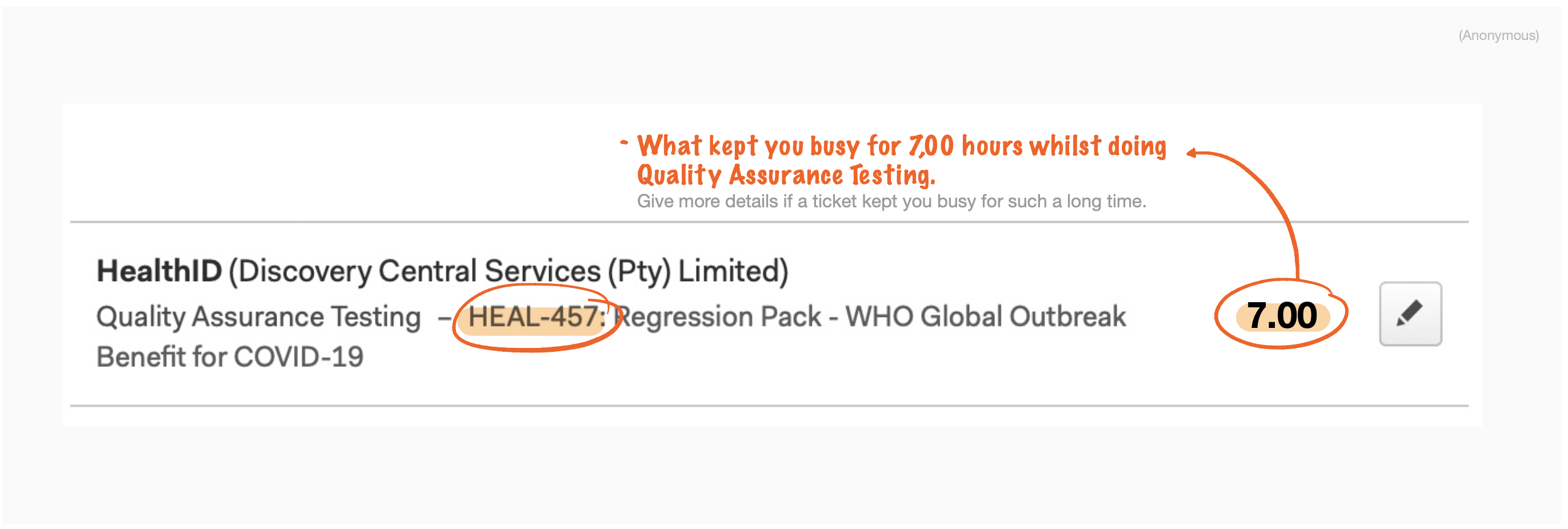
- If you reference or add JIRA ticket numbers, please include their descriptions.
- Often, the JIRA ticket description will not have sufficient detail, so please provide it.
Don’t record long hours with minimal detail
- If you spent 7 or 8 hours working on a single task, provide sufficient detail to account for your time (i.e. tell us what kept you busy all day).
Avoid using acronyms that mean nothing to anyone not working on the project.
For short catchups or adhoc meetings, add in the names of those you met with.
Always include the subject of the meeting request as well as the meeting organisers name, especially when it is a meeting with clients.
- If a meeting is internal the organiser should specify to the attendees which project to allocate it to and, at the end of the meeting, agree on the time spent so there is consistency across all the attendees.
Check your spelling
- It reflects badly on the entire team and Glucode if there are spelling mistakes on official documents.
Expense claims
You can record some expense claims
Any approved expenses related to your job should be recorded on the relevant project in Harvest. Examples of this would be travel (excludes travel to 1 Discovery Place), specific outings, etc. To ensure your expense claim will be covered, check with your Delivery Manager or Lead before you incur the expense.
Other expenses that you may record include
- Cellphone allowance
- Ad hoc requests only subject to prior approval
Warning
Travel expenses to and from our Sandton office is not a claimable expense.
Recording expense claims
Receipts or proof of payments must be uploaded as part of the expense claim or they will not be paid.
Expense claims must be recorded on Harvest within the week the expense was incurred. Before you submit that week’s timesheet make sure you have added all expenses with supporting documents.
All receipts or proof of payments must be handed in for filing.
Info
Expense claims should not be recorded for purchases that are not considered ‘ad-hoc’, for example the buying of software or tools that you require to do your job. Complete a requisition form for this purpose so that your request can be reviewed, approved and purchased on your behalf.
Submitting timesheets
When you should submit timesheets?
Your timesheet is not automatically processed by invisible software before being sent to the client for payment – while there is some software involved, it is not able to know if the detail is correct or if you’ve correctly allocated an item. This means people you work with in your teams (e.g. Delivery Managers, Leads) and various finance personnel spend significant time reviewing your timesheets, often to ensure that our timesheets are ‘client ready’ on a weekly basis.
You need to ensure your timesheets are personally checked, completed and submitted by Friday afternoon each week, for the entire week – each Delivery Manager will work out a time specific to your team, as this will vary from project to project. If you are going on leave before the end of the week or there is a public holiday, please check in with your Delivery Manager about how expectations will be adjusted for that week, so we are able to still meet invoicing deadlines while you are on leave.
Info
- Please round entries to 15 minute increments to make it easier for us to standardise across projects.
- If you are unsure to which project you should record your time to please ask your fellow team members, Delivery Manager or Lead.
Example timesheet entries
Examples of bad timesheet entries
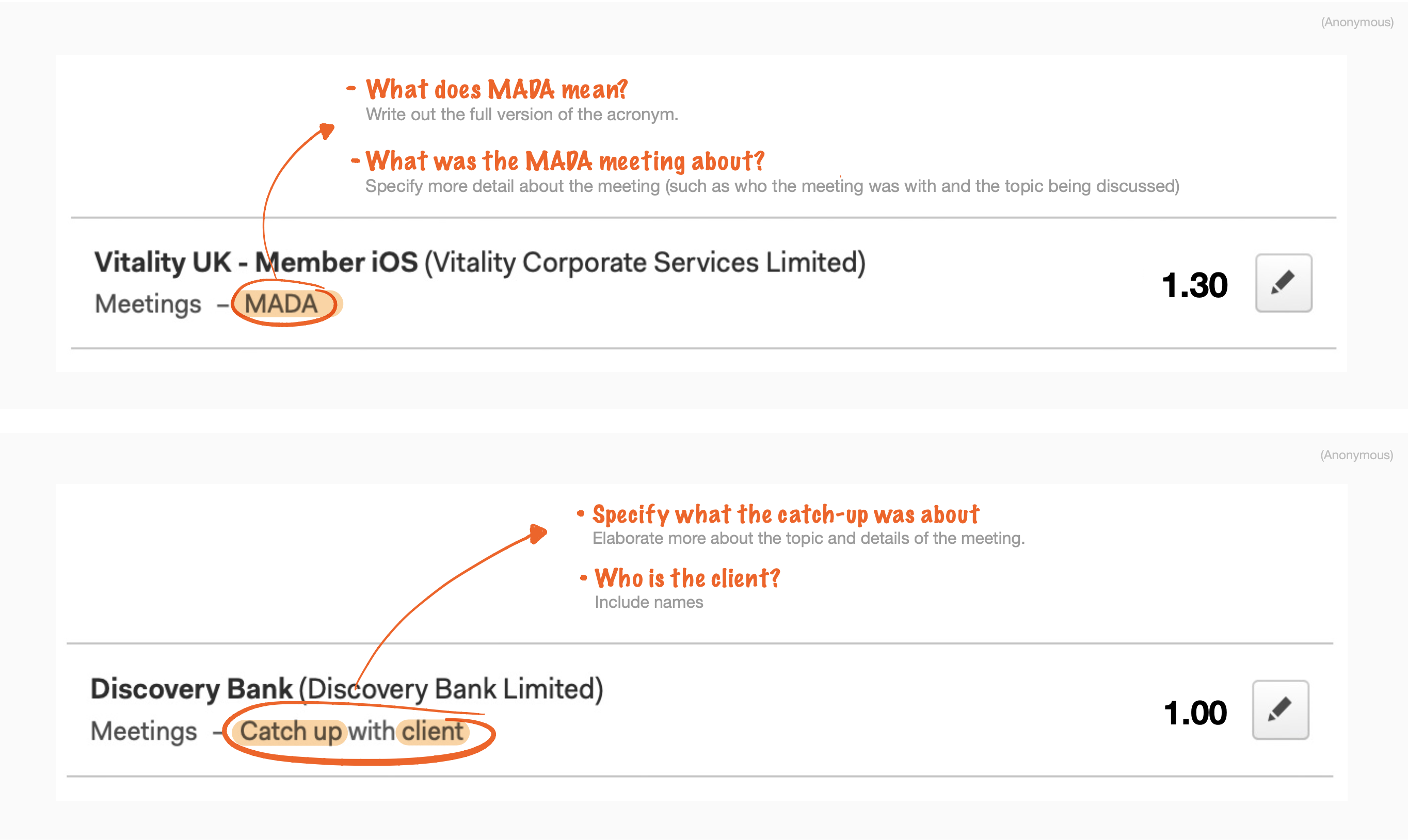
Examples of better timesheet entries
Examples of great timesheet entries